 XS Labs
My recorder app deleted interrupted recordings that would have played
Published 19 November 2026 · XS Labs
"I lost my 1 hour recording." That is a 2-star Google Play review of XSCamera, the Android background video recorder I work on, written on a OnePlus Nord CE5 with Android 16 and app version 4.0.9. Two more reviews in the same seven days said a recording was gone or would not open.
I have none of their files, so I read every code path in the app that can remove a video. One function deleted every .mp4 in the app's folder that had no database row, each time the recordings list opened. A recording whose process is killed never gets a row. The function assumed such a file cannot be played. On four phones with Android 13 to 16, all 22 recordings I killed on purpose played, the two longest minus their last 7 seconds and 1 minute 56 seconds. Version 4.0.11, in staged rollout since 18 November 2026, keeps the file and lists it as a partial recording.
The code that did it
This function shipped in every 4.0.x release, from 4.0.0 in October 2026 to 4.0.10:
/**
 * Deletes leftover .mp4 files in the hidden video folder that have no database entry.
 * These are unplayable fragments from a recording that was interrupted mid-segment
 * (the MP4 index is never written, so the file can't be repaired or played).
 */
private fun cleanupOrphanedSegments() {
    ...
    folder.listFiles()?.forEach { file ->
        if (file.isFile && file.name.endsWith(".mp4") &&
            !knownPaths.contains(file.absolutePath)
        ) {
            file.delete()
        }
    }
}
The database row is written when CameraX reports that the file is finalized. If Android kills the process during a recording, that event never arrives. The file stays on disk without a row, the recording never shows up in the list, and the next time the list opens the file is removed.
The function could also delete a recording that was stopped normally. Stop ended the foreground service at once, while the encoder needed about another second to finish the file, and during that second the file had no row. A list opened inside that second deleted a file that was still being written. A second reviewer wrote: "deleted my 5 minute recording ... when I had to view the recording immediately". That fits this path, but I never saw the file, so for that review it is a likely cause and not a proven one.
The comment describes the old MediaMuxer
I checked the comment's claim on a desktop first. One 60 second clip (1280x720, 30 fps, H.264 at 4 Mbit/s, AAC, 1,800 frames), stream-copied with ffmpeg 6.1.1 into four containers, each file cut with head -c at 25%, 50% and 90% of its size. Frames ffmpeg could still decode:
| Container | Cut at 25% | Cut at 50% | Cut at 90% |
|---|---|---|---|
| MP4, index at the end | 0 | 0 | 0 |
| Fragmented MP4 | 450 | 899 | 1,617 |
| Matroska (MKV) | 450 | 899 | 1,617 |
| MPEG-TS | 452 | 900 | 1,618 |
[mov,mp4,m4a,3gp,3g2,mj2] moov atom not found
cut90_plain.mp4: Invalid data found when processing input
The 90% file holds 28 MB of intact H.264 and ffmpeg will not open it, because a classic MP4 writes its index (the moov box) after the last frame. Android's MediaMuxer works this way. Its reference says "The caller must not use the file path before calling stop()." For a recorder built on MediaMuxer the comment is correct.
Every 4.0.x version of XSCamera records with CameraX 1.6.2. CameraX moved video recording to the Media3 muxer in 1.6.0 (25 March 2026), and the 1.6.0-beta02 notes list a fix for "video corruption during unexpected interruptions or app termination". So the comment describes a muxer that no 4.0.x release used.
What the Media3 muxer writes
CameraX builds the muxer with new Mp4Muxer.Builder(output).build(), all defaults. Recorder.Builder in camera-video 1.6.2 has nine setters and none of them touches the container. These constants are in Mp4Writer.java of media3-muxer, release branch, read on 18 November 2026:
// Used for updating the moov box periodically when sample batching is disabled.
private static final long MOOV_BOX_UPDATE_INTERVAL_US = 1_000_000L;
private static final int DEFAULT_MOOV_BOX_SIZE_BYTES = 400_000;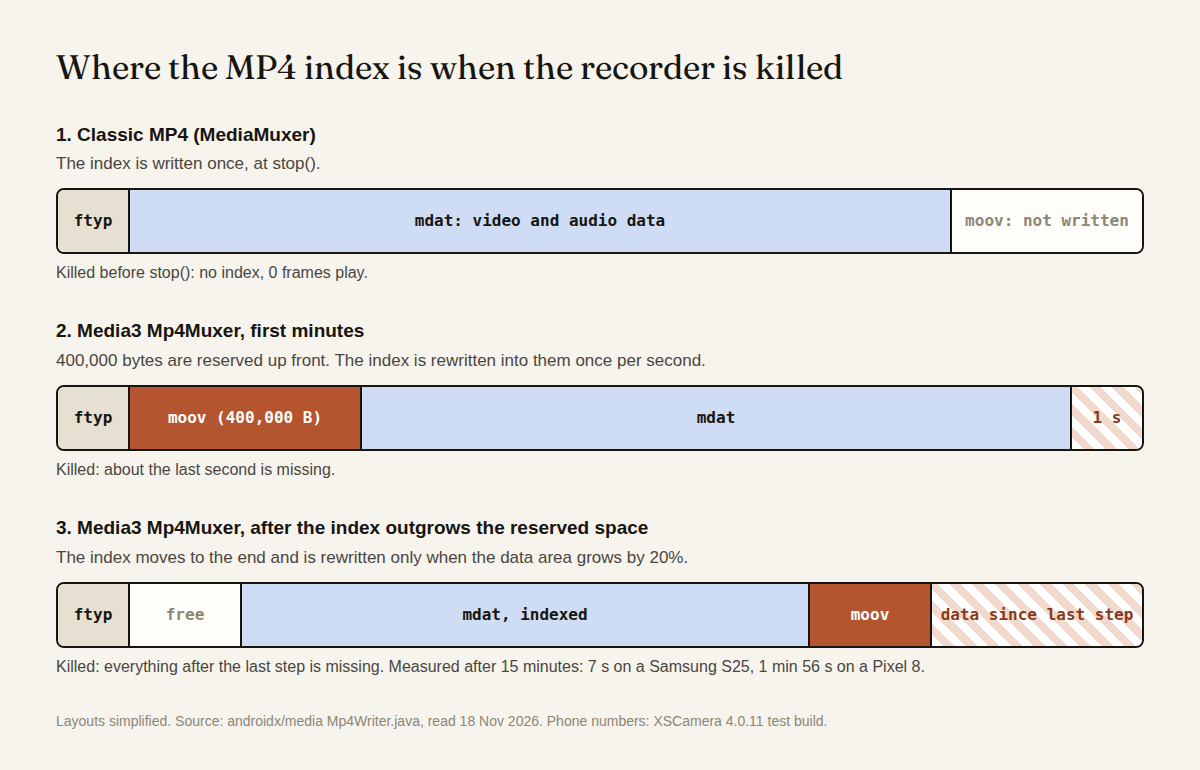
The writer reserves 400,000 bytes after ftyp and rewrites the whole index into them once per second of video. A kill in this phase can cost up to one second.
When the index outgrows the reserved space it moves to the end of the file. From then on it is rewritten only when the data area has to be extended:
long minBytesToExtend = 500_000L;
long maxBytesToExtend = 1_000_000_000L;
float extensionRatio = 0.2f;
Each extension adds 20% of the current size, at most 1 GB. Video written since the last extension has no index entry. Just before the next one, that part is 0.2 of 1.2, a sixth of the file. I do not know the exact moment the index leaves the reserved space, and the phone runs below did not log it.
Killing it on real phones
A test build of 4.0.11 ran on a Samsung S23 (Android 13), Pixel 8 (14), Samsung S25 (15) and Pixel 10 (16) on BrowserStack. A driver app started a recording and killed the process by force-stop, by an injected crash on the main thread or by one on the overlay thread. After the restart the test read the video samples back from the file, took the timestamp of the last one and played the file in the app's own player.
| Killed after | Runs | File size | Lost at the end |
|---|---|---|---|
| 25 to 30 s | 16 (4 per phone) | 5 to 25 MB | nothing measurable |
| 2 min | 4 (1 per phone) | 21 to 96 MB | nothing measurable |
| 15 min, Samsung S25 | 1 | 840 MB | 7 s |
| 15 min, Pixel 8 | 1 | 706 MB | 1 min 56 s |
"Nothing measurable" means the playable length was within two seconds of the planned kill time, and my kill timer is no more exact than that. Several 30 second files came out at 31.
I did not log where the extension steps fell in the two long runs. Both losses are under the one-sixth ceiling: 1 min 56 s is 13% of the Pixel 8 recording. Two runs say little about what is typical.
4.0.10 was not part of this run. Going by the function above, it deletes a file like each of these 22 when the list opens.
What 4.0.11 changed
4.0.11 removes the file.delete() call. When the list opens, a video file without a row is read with MediaMetadataRetriever. If it has a duration it gets a row, a "partial" mark and its real length. If it cannot be read it is still kept and listed, and a tap offers to copy it to a folder. The app now removes only empty files older than three minutes.
Stop no longer ends the service. The service stays in the foreground until the file is finalized and the row is written, then stops itself. The notification stays about one second longer because of that. A test opened the list 0.4 to 1.3 s after stop, five times per phone, and the recording was there all 20 times.
With "save to gallery" on, a cut recording was visible in the phone's gallery but missing in the app. The app now saves the file name when a gallery recording starts and lists that file as partial after a kill.
Not solved
A recording is still one file per session. By the one-sixth rule a kill at one hour can cost up to ten minutes. I have not run a kill later than 15 minutes.
The phone tests used the debug build of the same code. No Xiaomi, realme, vivo or OPPO phone was in the test, and nothing below Android 13.
The muxer builds the whole index in memory on each rewrite. Crashlytics shows OutOfMemoryError in androidx.media3.muxer.Boxes.moov for 28 users in one week, 32 events. I do not know how long those recordings were. I think one MP4 per session is the wrong default for a recorder, and mine still ships it. A new file every 30 minutes should cap both the index size and the loss after a kill, at five minutes by the same rule. That is not built.
A broken MP4 from an older recorder
My three dead desktop files came back with untrunc, which learns the frame layout from a healthy file made by the same encoder. Commit 87a5d92:
$ untrunc ref.mp4 cut90_plain.mp4
Info: Found 4152 packets ( mp4a: 2531 avc1: 1621 avc1-keyframes: 55 )
Info: Duration of avc1: 54s 33ms  (54033 ms)
Info: saving cut90_plain.mp4_fixed.mp4
54 seconds out of the 54 in the file, with sound. The 25% and 50% cuts gave 451 and 899 frames. The reference was an 8 second clip from the same encoder with the same settings. With a 1080p clip from a different encoder as reference, untrunc found 2 frames and stopped.
For a phone that would mean keeping the broken file, recording ten seconds with the same app, camera and resolution as the reference, and running untrunc good.mp4 broken.mp4 on a computer. I have not run it on a file recorded by a phone, and not on H.265.